A commercial renovation management system — from budgeting and procurement to handover
A private client system that brings the budget, actual spend, procurement, payments, stages, snags, documents and design decisions of a renovation into one place. I designed and built the product on my own: turning scattered spreadsheets and a PDF design package into a connected data model, wiring up Google Sheets synchronisation, and adding AI features that work strictly from the project’s own data.
Private client system
Access is limited to the client; no public demo is available.
Development began in June 2026; the first working version was built in 3 days
Role: Product concept, analysis of the existing process and source documents, Telegram interface UX, architecture, independent backend and database development, data import, Google Sheets integration, AI features, testing, production deployment and ongoing support
Stack
- Python 3.14
- aiogram 3.x
- SQLAlchemy 2.0
- SQLite
- OpenRouter
- APScheduler
- Google Sheets API
- gspread
- Google Auth
- openpyxl
- pandas
- Mac Mini
- to the first working version
- 3 daysto the first working version
- procurement catalogue items
- 248procurement catalogue items
- renovation stages tracked
- 7renovation stages tracked
- core operational sections
- 11core operational sections
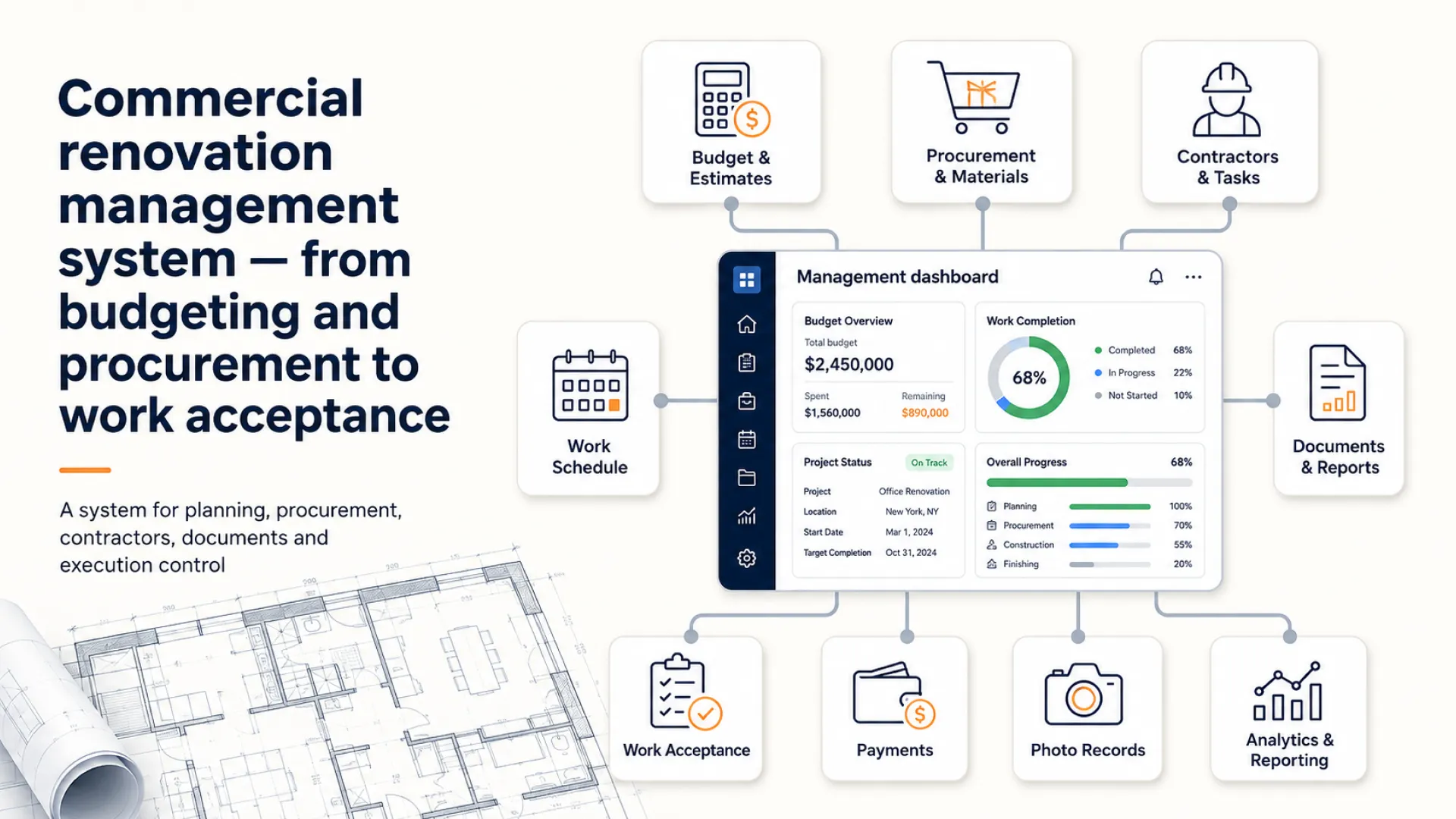
Context and challenge
Running a renovation means holding the budget, procurement, payments, deadlines, documents and quality of work in view at the same time. All of that information started out in different formats and different places: the designer’s spreadsheet, the contractor’s estimate, a PDF design package, procurement data, payments, deadlines, documents, snags and individual working decisions.
The designer’s and the contractor’s sheets were built on different structures and naming conventions, and room numbering differed between documents. Some decisions were alternatives rather than additions: competing electrical options cannot simply be added together, or the budget doubles up on something that will only be bought once.
To understand where the renovation actually stood, someone had to reconcile files by hand and hunt for the current figures — separately for the budget, separately for payments, separately for procurement and deadlines.
The product was built for one person who needed a single working system for one specific renovation, not a corporate ERP with a rollout and training programme.
Who the product is for
- a private client running a complex renovation themselves
- an owner’s representative or renovation project lead
- someone coordinating contractors, procurement and payments
- a user who needs one view of the budget and the progress of the work
- a client for whom several disconnected spreadsheets no longer work
- a private client product, not intended for public sign-up
One operating system for a renovation project
I built a private system that turned scattered documents and working data into a connected model. Telegram handles day-to-day operations, SQLite holds the data, and Google Sheets gives the client a legible, up-to-date view.
The value is in the connections rather than in the individual tables: a purchase recalculates the budget, a payment feeds the cash-flow forecast, an open snag blocks the acceptance of a stage, a document is attached to a project entity, and competing options never get mixed in with work that genuinely adds up.
Budget and actual spend
Planned against actual figures by category, the remaining budget and an expense log; amounts are only ever handled with exact monetary types.
Payments and cash flow
A payment schedule, payment confirmation, upcoming obligations and a forecast of money going out.
Procurement and catalogue
A 248-item catalogue with filters, quantity, price, supplier, links, notes and automatic budget recalculation.
Decisions and alternatives
Competing options are never summed: the system keeps chosen decisions separate from materials and work that genuinely complement each other.
Stages, acceptance and snags
Seven stages with deadlines, contractor and cost of work, plus acceptance, rejection and a punch list. A stage cannot be accepted while snags remain open.
Documents and working material
Source files, contracts, estimates and other documents are stored and attached to the entities they belong to.
Google Sheets and reports
SQLite stays the source of truth while Google Sheets acts as the working view. Changes to the catalogue and the budget flow back through a controlled sync.
AI assistant and notes
The assistant answers strictly from the project’s data. Free-form notes are stored verbatim and can be attached automatically to a room, a stage or a category; if the AI step fails, the note is never lost.
My role
I went through the whole product cycle myself: I worked through the source documents and the way the renovation was actually run, defined the product model, designed the user scenarios and the data architecture, built the Telegram interface, the backend, the database, the import, the synchronisation, the reports and the AI features, deployed the working system and handed it over to the client. AI-assisted development served as a tool to speed up design, writing code and checking scenarios, while the requirements, architectural decisions, testing and responsibility for the finished product stayed with me.
- researched how a private renovation is actually kept under control
- worked through the designer’s spreadsheet and the contractor’s estimate
- studied the PDF design package and the decisions already made on site
- defined the product model of the system
- designed the structure of the budget and actual spend
- created a canonical register of rooms
- mapped the differing room names and numbering between documents
- designed the procurement catalogue model
- implemented the rules for alternative and complementary decisions
- imported and normalised 248 catalogue items
- designed the seven renovation stages
- implemented acceptance and the handling of snags
- built the expense log
- built the payment schedule and the cash-flow forecast
- built the document library
- set up reminders and reports
- designed the Telegram UX and the FSM scenarios
- designed the database and the backend
- set up Google Sheets as the client-facing view
- implemented controlled two-way sync of the catalogue and the budget
- built an AI assistant that works from the project data
- implemented free-form notes with fail-soft AI classification
- prepared tests against an isolated test database
- deployed the system to production and handed the working product over to the client
- continue to support and develop the product
I designed this not as a set of separate spreadsheets and bot commands, but as one control loop for a renovation, where the budget, procurement, payments, stages, documents, snags and decisions are all connected.
From fragmented project files to a working system
- June 2026
Source documents and operational workflow
Studied the structure of the renovation, the designer’s sheets, the contractors’ estimates, the design package and the day-to-day job of the person overseeing the work.
- Design
A connected model of the renovation
Designed rooms, budget, catalogue, stages, expenses, payments, documents, snags and decisions as connected entities.
- 3 days
The first working version
Independently built the core working loop and deployed the system for use on a real project.
- Now
In use and evolving
The client uses the product. Since the first version it has gained Google Sheets synchronisation, reports, reminders, the AI assistant and notes with automatic classification.
Technology and approach
The system had to handle real financial and project data dependably, keep information safe when external services fail, and never conflate alternative options from an estimate. The architecture separates the Telegram interface, the business logic, the database, the import, the synchronisation, the scheduler and the AI features.
Telegram interface and scenarios
Python and aiogram 3.x power the operational sections, the asynchronous FSM scenarios and whitelist-only access.
Data and business logic
SQLAlchemy 2.0 in async mode and SQLite hold the connected models of budget, catalogue, stages and documents; monetary values use Decimal and Numeric only.
Import and Google Sheets
openpyxl, pandas, gspread and Google Auth bring the source sheets into the system. SQLite stays the source of truth; the spreadsheet is a working view with changes applied under control.
Automation and AI
APScheduler drives reminders and reports, while OpenRouter powers the project-data assistant, image processing and notes with fail-soft classification.
Team and responsibilities
- Daniil Berdinskikh
- Product concept, analysis of the process and the documents, architecture, UX, independent development of the system, database, import, synchronisation, AI features, testing, production deployment and ongoing support.
- The client
- Framing the practical problem, providing the source material, using the product on a real renovation, making the project decisions and giving feedback.
Outcome
A commercial brief became a working private system that the client uses to run a real renovation. The product connected data from separate sources into one workflow for controlling the budget, procurement, payments, stages, documents and quality of work.
- the first core working version was built in 3 days
- the product was independently designed and built by Daniil
- the system runs in production
- the client uses the product to manage an active renovation project
- the source spreadsheets and PDF design package became structured data
- 248 items were loaded into the catalogue
- 7 renovation stages are configured in the system
- a unified register of nine rooms was created
- 6 groups of alternative electrical options are accounted for
- budget, expenses, payments and procurement are connected in one system
- stages are tied to acceptance and to snags
- documents and working decisions are held in one place
- Google Sheets gives the client an up-to-date working view
- far less manual searching and reconciling of data is needed
- the budget, procurement, payments and deadlines are easier to keep in view
- the system helps make sure snags and obligations are not missed
- the AI assistant works only from the project context
- the product continues to be supported and developed
Current status
The system runs in production and is actively used by one client to keep a real renovation under control. The working loop covers the budget, expenses, procurement, payments, stages, snags, documents, reports, Google Sheets synchronisation, the AI assistant and notes.
I continue to support the product and develop it around the client’s practical scenarios.